A Practical Workflow for AI Coding Assistants
Jon Green • Published on Dec 11, 2025
I gave this talk at Converge 2025 on December 11, 2025 — Stanford IT’s first combined conference, folding fourteen years of IT Unconference and six of CyberFest into one day at the Li Ka Shing Center.
The question I opened with:
Many of us are experimenting with AI coding assistants — but how do you turn “neat tricks” into a repeatable workflow your whole team can use?
- Session page: A Practical Workflow for AI Coding Assistants at Converge 2025
- Slides: A Practical Workflow for AI Coding Assistants (PDF, 22 slides)
- Recording: YouTube (48 minutes) — or a self-hosted mirror, in case that link ever stops working
- Transcript: full transcript, every timestamp linked into the recording
- Demo repository: code.stanford.edu/jon.b.green/ai-arcade-demo — public, clone it
The number that actually matters
Three figures went up early:
| 55% faster task completion | Microsoft Research, on GitHub Copilot |
| 2× coding speed | McKinsey pilots, 2023 |
| 46% trust the accuracy | Stack Overflow Developer Survey, 2024 |
The first two get quoted constantly. The third is the one I built the talk around. Adoption is near-universal and trust is a coin flip — developers use these tools daily while more than half don’t believe the output.
I said on the day that the goal was to show you how to get above that 46%, using tests, test-driven development, and specs. That’s the whole thesis. The workflow is not about making the assistant write more code; it’s about making its output checkable.
Worth noting the first two numbers are Copilot-era, measuring autocomplete. The tools I’m demonstrating run commands, run tests, and iterate until checks pass. The studies understate it.
Four parts, no magic
Before any slides, I ran a demo — deliberately, because I didn’t want it to look like I had a bag of tricks. The repository is public. The code you see is what’s there.
Then, the reveal:
I’m not a magician.
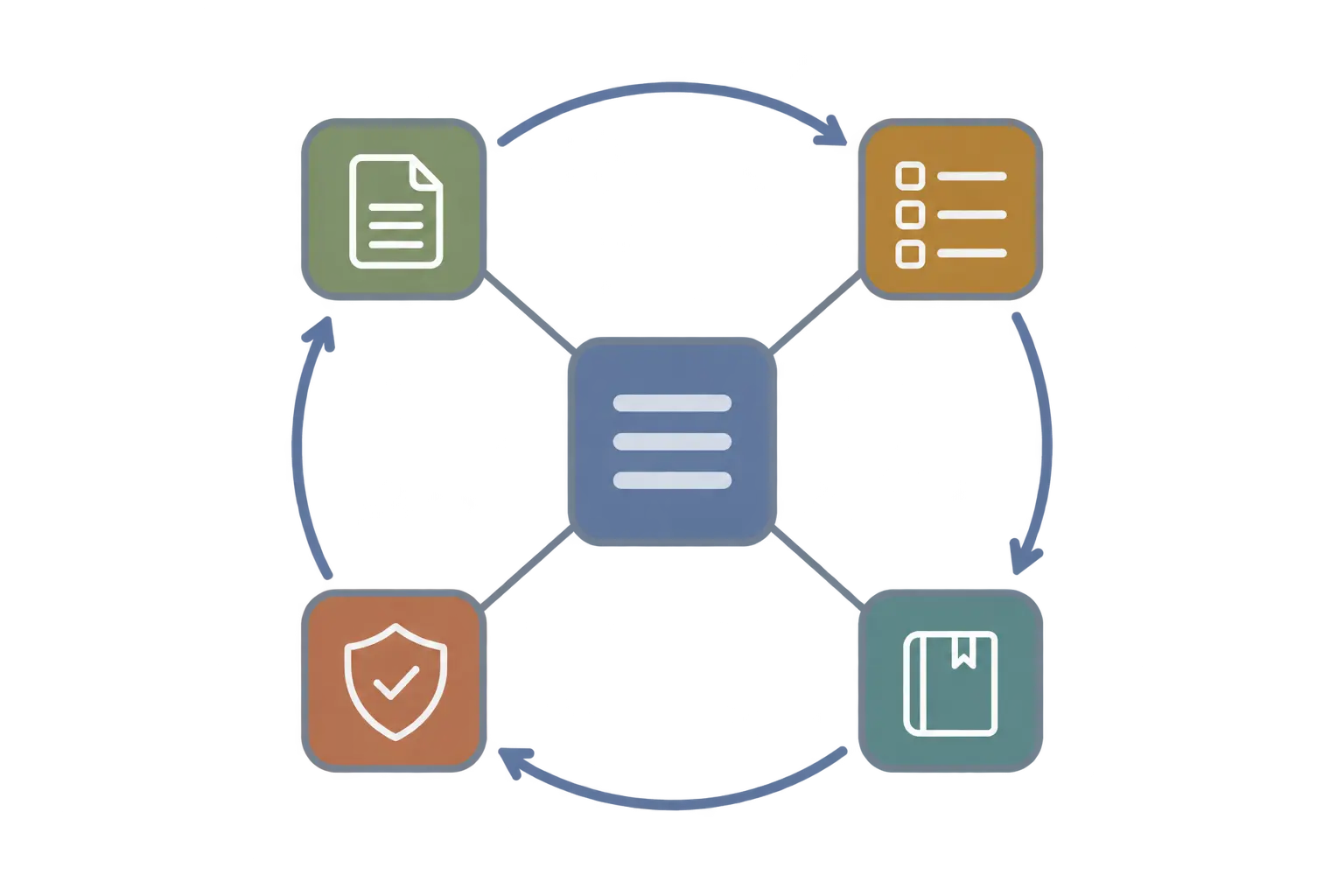
Four parts, all living in the repository: notes, tasks, guides, tests. They feed each other, and the deck’s word for the loop is self-reinforcing. Any one alone is a chore; together they compound, because all four are what the assistant reads at the start of the next session.
The constraint that produces them: if the assistant needs to know it, it goes in the repo. Not a wiki, not a chat thread, not the tool’s own memory — those solve continuity for one person on one machine and lose it the moment a colleague clones the project.
1. Notes — because the context window runs out
I’ll be honest about the real reason this exists, because it isn’t the one people expect.
The assistant runs out of room. Its context window fills, and then it has to compress. The built-in compression is lossy in a way you can’t predict: it always forgets something important. Notes are how you recover reliably — a durable log outside the conversation that a fresh session can read to find out where it was.
So the instruction is simply: take notes as you go. An audit log of errors hit, solutions found, decisions made. I built a refresh command that reloads that context on demand.
Stored in .session-notes/ at the repository root, one file per day per work thread, named YYYY-MM-DD-task-description.md, with the task name repeated across days:
2024-01-15-api-auth-refactor.md
2024-01-16-api-auth-refactor.md
2024-01-17-api-auth-refactor.md
The template is deliberately small:
# [Task Description]
Started: [output from `date` command]

## Goal
[One line: what am I trying to accomplish?]

## Current State
Phase: [Exploring | Planning | Implementing | Debugging | Testing | Completed]

## Working Notes
[HH:MM] 📋 User request: [what they asked]
- 📝 What I did: [actions taken]
- 💡 What I learned: [discoveries]
- → Next: [what comes next]

## Quick Reference
[Commands/paths/snippets for reuse]
Four triggers, so it doesn’t depend on anyone remembering: before a handoff, after a commit (log the commit ID so you can retrieve the history later), after an error, and throughout the work.
The team-continuity benefits are real, but they’re a side effect. The context window is the reason.
2. Tasks — specs, not tickets
This started as a little to-do list I had the assistant maintain. I kept adding detail until the entries became documents in their own right. The workflow evolved organically out of using it.
A todo/ folder, a TODO-INDEX.md as the master list, one file per task as {NNN}-{task-name}.md, zero-padded so they sort. Status and priority live in the header:
**Task Number**: NNN
**Status**: ❌ Pending
**Priority**: 🔴 HIGH / 🟡 MEDIUM / 🟢 LOW
**Complexity**: 🔴 High / 🟡 Medium / 🟢 Low
**Risk**: 🔴 High / 🟡 Moderate / 🟢 Safe
**Estimated Time**: [e.g., 2-3 days]
**Actual Time**: (filled after completion)
Five states: Create → Review → Build → Done → Archive (record the commit hash and the command to retrieve it).
Creating a task is itself a conversation. You say what you want; the assistant knows the house format because it’s described in AGENTS.md; it drafts; then you review. Cut what you don’t want, add what’s missing, iterate until you’re happy. Then building is iterative too.
Crucially, the spec contains no code. Some paths, some config, sometimes a pointer to test files. The Snake spec in the demo repo runs 327 lines — problem, approach, implementation steps, success criteria, risks, testing strategy, explicit non-goals for v1 — and not one line of implementation.
The honest caveat I gave on stage: these are non-deterministic systems. It builds a different game every time. I’d run the demo half a dozen times in testing; Mario and Pac-Man usually came out with some bugs. That’s the nature of it, and it’s why the review step is not optional.
3. Guides — teaching it a process
Guides are documents that teach the assistant how to do a specific thing: how to debug a page, how to apply a patch. One site I work on has a genuinely tedious patching process; I wrote it up as a guide, and now the assistant reads the guide and does about 90% of the patching by itself.
They live in docs/guides/ with category subfolders — processes/, troubleshooting/, patches/, tutorials/ — as GUIDE-{topic}.md, started from a template, with the index README updated as they’re added.
The security problem is real and specific. It really likes to put everything into the guide, including things that shouldn’t be committed. So I wrote a script that scans for secrets, and the rule is placeholders only. You can tell the assistant to run the verification script and it will insert the placeholders itself before the guide ever reaches you. Automate this; don’t rely on diligence.
4. Tests — guardrail and accelerator
Tests are the guardrail, and they’re how you get above that 46%. But the benefit I didn’t anticipate is that they keep the assistant focused while it works.
Ask for a test that the items are selectable, that this or that behaves — it writes the test, runs it, finds its own failures, and fixes them before coming back to you. The iteration loop closes without a human in it. You come back for the real review.
They also stop the specific failure mode everyone hits: it fixes one thing and breaks another, or you add a feature and it reintroduces code you’d already fixed. With a test in place, that regression doesn’t happen.
Five layers — tests/unit/, tests/integration/, tests/e2e/, tests/smoke/, tests/security/ — driven through Make targets over whatever runner the project uses, so the command is identical regardless of stack. CI runs unit + integration + smoke on pull requests, and e2e + security scans nightly.
The demo: what actually happened
Snake, from a spec, in two minutes. It read todo/003-snake-game.md, wrote the tests first, ran them and watched them fail — as expected — then implemented until they passed. About 162 lines. Then we ran it: collisions, self-collision, playable. That game did not exist before the session started.
I asked the room how long all the remaining games would take a developer. A few hours, maybe days. Then I pasted the second prompt and started 14 agents in parallel — Frogger, Space Invaders, Flappy Bird, Mario, Street Fighter, Galaga, a Pokémon RPG, Tetris, Minesweeper, Game of Life, Pac-Man, Dyno Runner, Pong, and the launcher — and went back to the slides while they ran.
And then it broke, live, in front of everyone.
The context window filled. Compaction triggered, the conversation got too long, and Claude Code itself threw an error. I exited, tried to resume, that didn’t take either, and I ended up starting a fresh conversation. My screen share dropped at the same moment for good measure.
I’m keeping this in the write-up because it’s the most useful thing that happened. The failure was the argument for the notes. The session that died was the one taking notes as it went; the fresh one read them, looked at the code, and picked up where the dead one left off. That is precisely the scenario the whole practice exists for, and I got to demonstrate it by accident rather than by slide.
It recovered. The games were there:
- Frogger — cars, logs, and you drown if you miss
- Galaga — lives, waves, though the enemies weren’t shooting back
- Pac-Man — playable, ghosts lethal, but with dead ends in the maze and no power pellets
- All 773 tests passing
Pac-Man’s maze is a fair illustration of where the line sits: the loop got it 90% of the way in minutes, and closing the last 10% is iteration you do with it, using the same task system.
Then we wrote a spec live. I asked for a game; someone said Sudoku. The assistant read the guide, asked what belonged in v1 — we picked one difficulty level and pre-generated puzzles — allocated task #17, and wrote the whole spec, including a testing strategy. We reviewed it, told it to build, and it worked through the phases test-first. Sudoku, playable, from an audience suggestion.
Someone asked how it knew what a Sudoku spec should contain. Because it already knows Sudoku — the model brings the domain knowledge. For something genuinely novel it asks about core gameplay instead; the guide carries a worked example to show it the shape of the answer.
From the Q&A
“How much time do you spend on specs?” Most of my work is now writing and reviewing them. It’s more reading than it used to be — but you find bugs in a spec before any code exists, and you can check the architecture isn’t going somewhere wonky. You think at a higher level: what am I making, what’s a good design. It’s more work up front and it pays back in development speed.
“Isn’t it a black box?” No. I still read the code and I still check the tests. It’s just less about writing code and more about judging whether what came back has what I asked for and passes.
“This works for games where the AI knows the algorithm. What about unique business requirements?” That’s exactly where spec iteration earns its keep. The business rules go in the spec, and you develop the spec and the code together. If it builds the page wrong you tell it; if it picks the wrong JSON structure you correct it. It is not hands-off — it’s hands-on at a different level.
“Databases?” Put the schema in the spec if the system already exists and must be matched. If you’re building new, describe what the data needs to hold, let it propose a schema, then check the proposal makes sense.
“Which assistant?” I built this on Claude Code and it’s the best I’ve tested — and that doesn’t mean it’ll be the best tomorrow. Gemini is strong and has a free tier; Kiro is worth revisiting. Keep trying them. This is moving too fast to marry one.
Which is the case for keeping the workflow in plain markdown in the repository. In the demo repo, CLAUDE.md and GEMINI.md are symlinks to a single AGENTS.md, and the same slash commands are mirrored for Claude Code, Cline and Amazon Q. Nothing here is tied to a vendor.
Where this goes
Three stages, and we’re at the first:
- Today — manual text files. Notes, tasks and guides as markdown, version-controlled, orchestrated by hand.
- Tomorrow — integrated tooling. Agents maintain their own session context; guides referenced without manual file management.
- Later — context repositories. Pick up a feature you left months ago. Non-technical users writing specs that feed the same system, with someone technical still reviewing them.
Every one of these habits is a workaround for something the tools don’t do yet. The markdown is cheap and portable, and when the tooling catches up the content comes with you.
Meanwhile the job changes shape — toward review and evaluation, testing and validation, and system design and architecture.
A concrete example from my own work: I’d built something in a language whose library wasn’t powerful enough for the features coming. I wrote a spec saying move to this language and this library, and it translated the code across. All I had to do was review it — and reviewing code in an unfamiliar language is far easier than learning that language first. That’s the pivot speed these tools actually buy you.
What to take away
- Take notes for the context window, not for posterity. Compaction loses things. A durable log is how you recover.
- Write specs with no code in them. Bugs are cheaper to find there than in an implementation.
- Let it draft the spec, then review properly. That review is now the job.
- Put guides next to the code, and scan them for secrets automatically. It will commit things it shouldn’t.
- Have it write tests as it goes. They keep it focused, close the loop without you, and stop regressions.
- Stay vendor-neutral. One instruction file, symlinked. You will switch tools.
None of it requires a particular assistant, and none of it is wasted when you change your mind about which one to use.
Thanks to Ray Saray and Ali Karim for access to Claude Code, which this workflow is built on, and to Rafael Cruz, who tested every early version and was very patient about it.